
Meet Colla, your AI wedding planning companion.
For the budgets, the bookings, and the occasional “wait, did we pay that?”
Colla is an AI wedding planning companion for the Claude desktop app. The Starter Kit gives you Colla, a wedding planning workbook that does all the sums, and your Wedding Journal. You chat, Colla keeps everything up to date, and the decisions stay yours.
Coming soon, right here and on Etsy.
Prefer Etsy? Colla is on Etsy too.
One ZIP file. Here’s what’s in it.
Unzip it and you’ll find all of this.
- Colla and its helpers
- One plugin file you upload to Claude once. It brings Colla plus specialist helpers for money, suppliers, guests, filing, the wedding day and checking every figure.
- Your wedding folder
- A ready-made Colla Wedding folder for your computer, with a place for quotes, contracts, guests, design and the day itself.
- The wedding workbook
- The planner where every number lives. It works out what each supplier really costs in your currency, what’s due when, and whether the money will be there each month. You never have to open it.
- Your Wedding Journal
- A private, live page with your whole wedding on it: vision, money, suppliers, guests, menu, seating, music, photos and the day. Colla publishes it as a private link in your own Claude account.
- The Companion Handbook
- A step-by-step guide with pictures, from first click to your first Sunday run, plus a one-page quick reference.
- A sample couple
- Amira and Tom’s finished Journal and workbook, so you can see what yours will look like before you start.
You talk. Colla does the admin.
No commands to learn. These five phrases get the big jobs done, and plain English works for everything else.
- “How is the money looking?”Where you stand, the month the money runs shortest, what to save each month and one trade-off worth knowing.
- “What’s this week?”The countdown, the next three things and who owns each, payments due and replies owed.
- “File my inbox”Colla reads each file you dropped in, names it with the company, document and date, files it and tells you what moved.
- “Check my Journal”The changes you made in your Journal go into your planner now, instead of waiting for Sunday.
- “Explain that number”Where a figure came from, in plain words, so you can check it yourself.
Have a look around.
Switch pages along the bottom. Or open the real thing and click away.
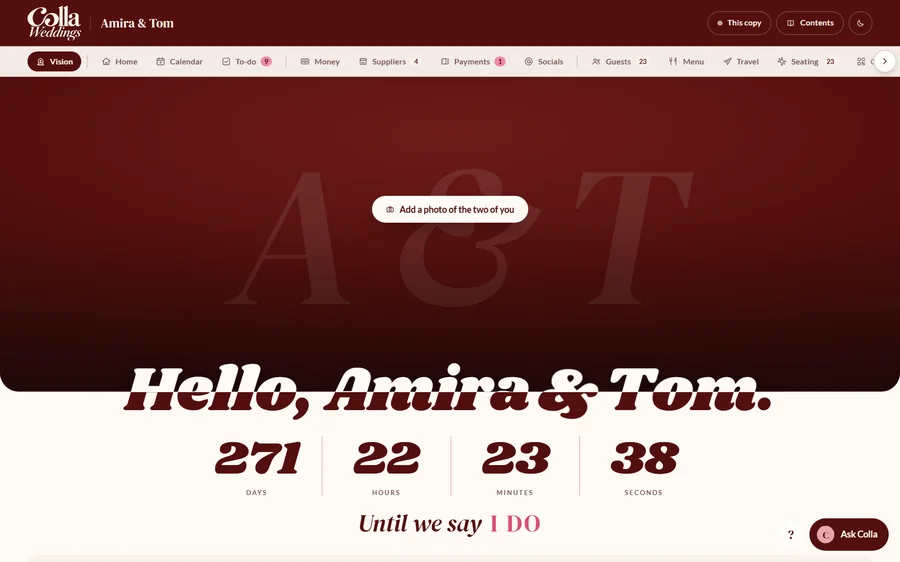
- Your photo, a live countdown and the feel of the day: your colors and three words.
- Add a mood board and it lays itself out like a magazine, with your favorite picture as the cover.
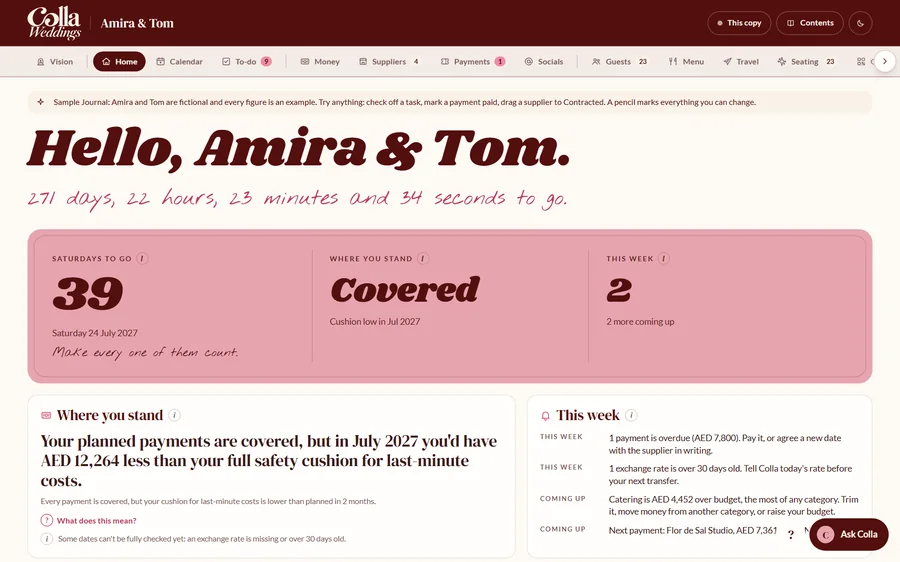
- Where you stand, in one sentence. Read it first, every time.
- Up to three things for this week, the payments coming up and how far you’ve come.
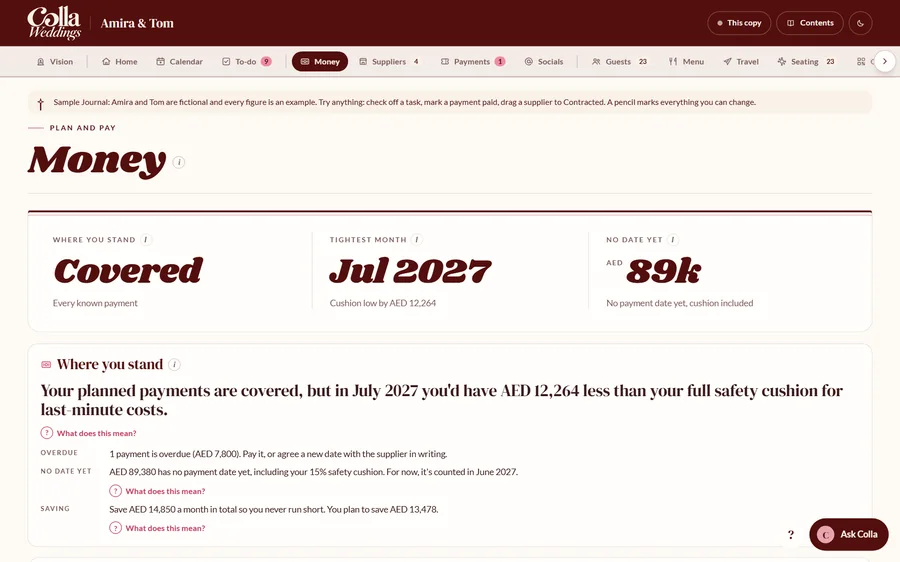
- Month by month, because a healthy total doesn’t mean every month is safe.
- Payments due show up as tickets. Tap Paid when the money’s gone.
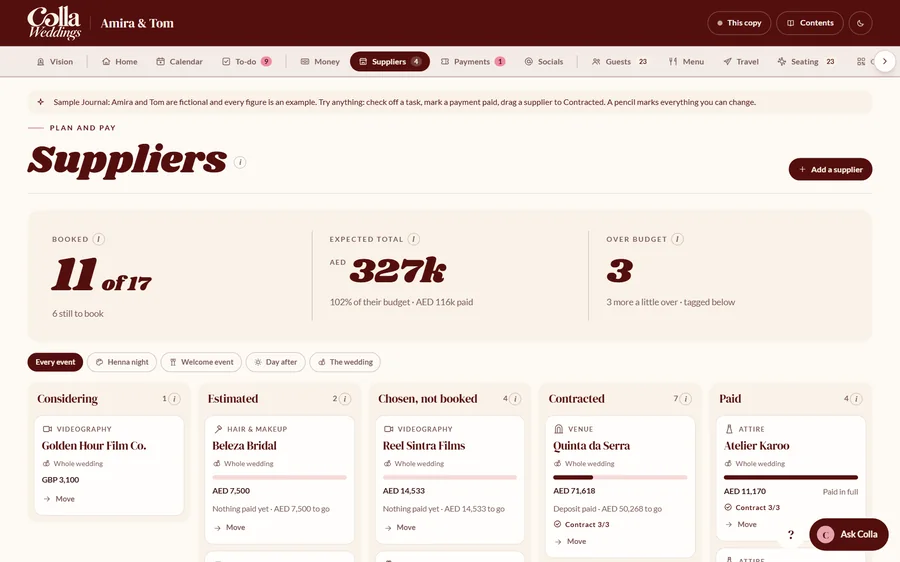
- Every supplier on one board, from Considering to Paid. Drag a card along.
- Move a supplier to Contracted and there’s confetti. Obviously.
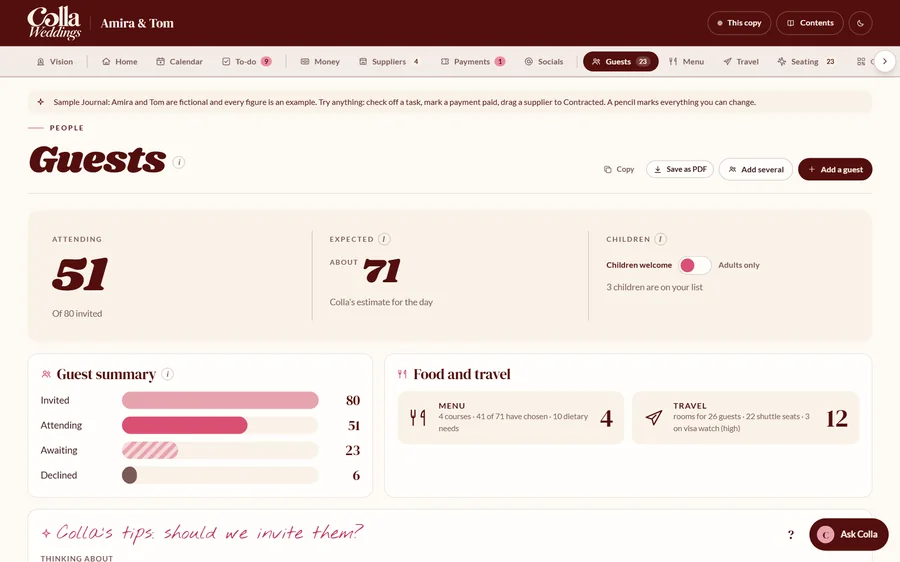
- RSVPs, meal choices and tables in one list. Select any name to change it.
- The kitchen’s tally and the dietary list work themselves out.
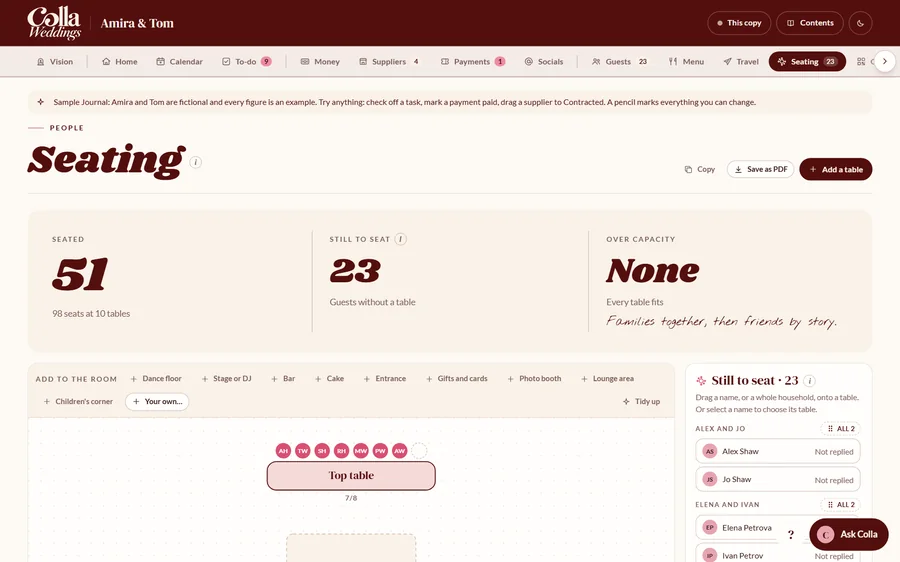
- Drag, resize and turn anything on the floor plan.
- Drag a guest, or a whole household, onto a table.
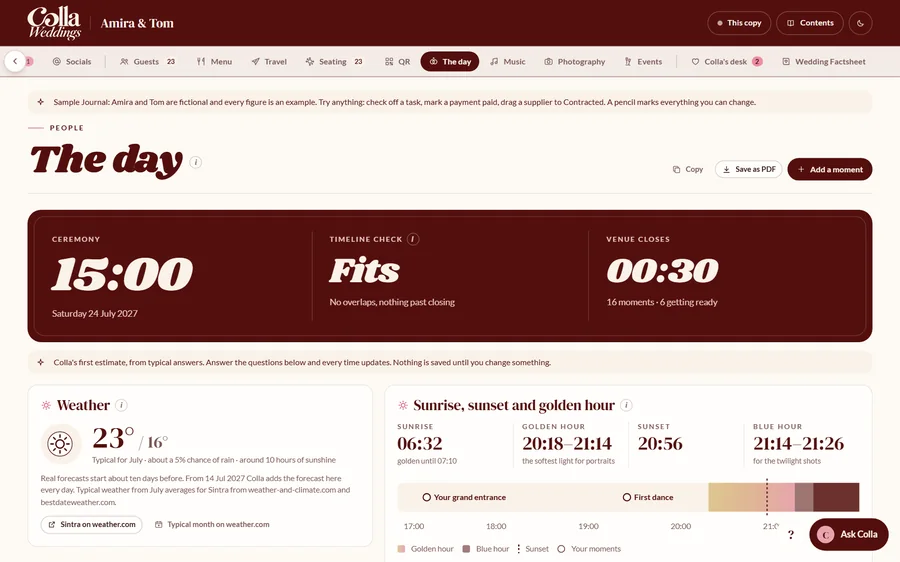
- Sunrise, sunset and golden hour for your venue’s exact spot.
- Build your running order one card at a time, then save it as a PDF for your venue.
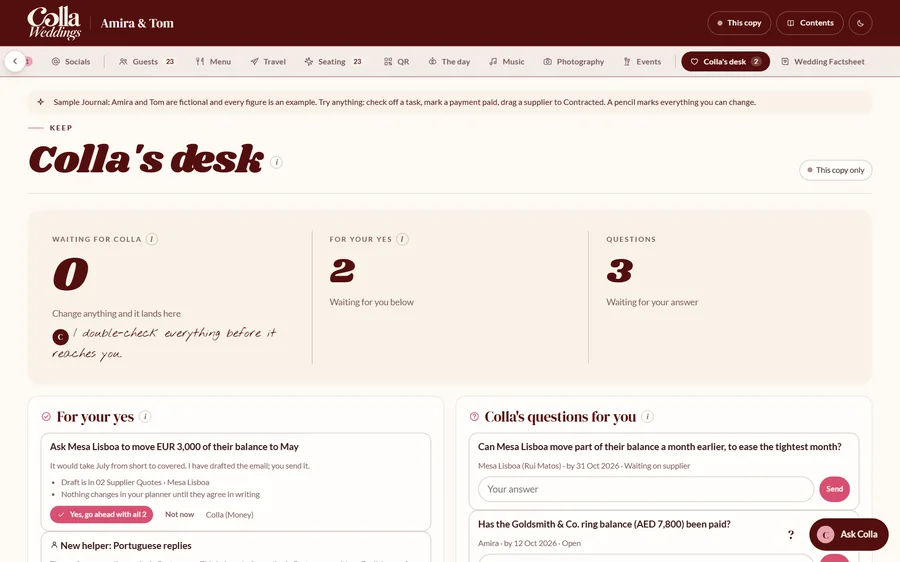
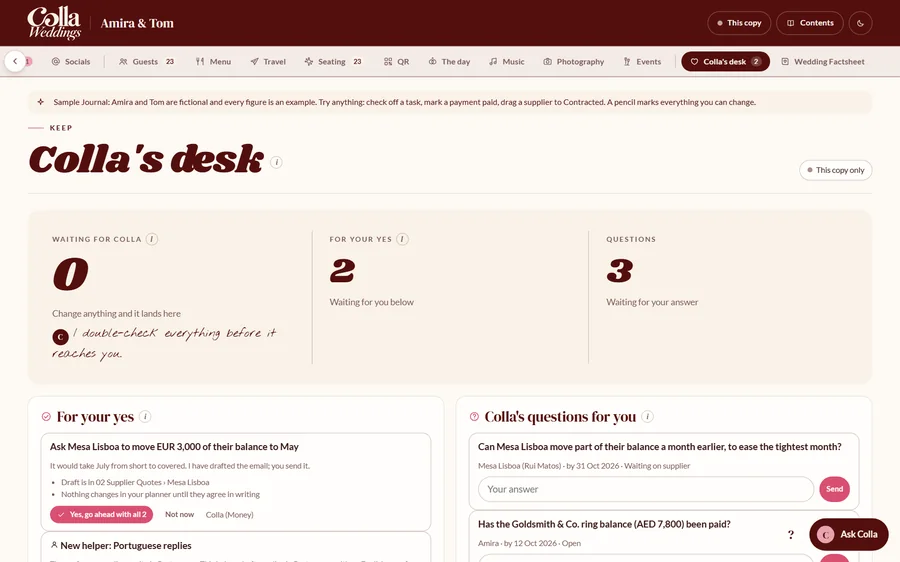
- Every change you’ve made, the questions Colla has for you, and anything waiting for your yes.
- Nothing is added to your plans until you press Yes.
Screens from the sample Journal that comes with Colla. Amira and Tom (and their suppliers) are made up. Try it yourself
What you’ll need.
Please check these first. Colla runs inside Claude, so a couple of them come from Anthropic, not from me.
- A paid Claude plan
- Required. Pro, Max, Team or Enterprise. Colla works in Cowork, which isn’t part of Claude’s free plan (as of October 2026). Plans and prices change, so check claude.com/pricing.
- The Claude desktop app
- Required. Free from claude.com/download. Colla is built for Windows and Mac; so far it’s been tested on Windows.
- A laptop, one evening
- Required. About 20 minutes of setup, then 20 minutes to an hour for your first chat with Colla.
- Computer on for check-ins
- Required for the check-ins. Colla’s weekly run (Sundays, 5 p.m.) and monthly review (the 1st, 9 a.m.) only run while your computer is awake with Claude open. Anything you ask in a chat works at any time.
- A wedding Gmail
- Optional. One shared address for both of you, so Colla can sort wedding mail and draft replies. You can add it later.
- A note taker
- Optional. Fathom or Granola (separate apps with their own plans) let Colla turn the next steps from supplier calls into tasks for you to approve.
From checkout to your first chat.
Colla isn’t on sale just yet. It’ll be a digital download you can buy right here or on Etsy, and if you join the launch list, I’ll email you the day it goes live.
Colla is a digital download for one couple, sold right here. You’ll get the ZIP straight after checkout.
Two costs to know about: Colla itself (a one-off purchase) and a paid Claude plan, which you pay to Anthropic.
Prefer Etsy? Buy Colla on Etsy instead.
- Buy the Starter KitA digital download for one couple, so there’s nothing to wait for in the post.
- Download and unzipMove the Colla Wedding folder into your user folder (the handbook shows exactly where).
- Install the plugin and make your projectOne file uploaded, one paste. About 20 minutes in total.
- Say “hi” to CollaIt checks everything is ready, asks a few questions at a time and builds your Journal.
What’s tested, and what’s still on the list.
The small print, in plain words.
- Tested so farColla has been built and checked in a test environment and on a Windows laptop. The workbook opens cleanly in Excel 2019.
- Still being testedSetup on a Mac, a first setup on a brand-new Claude account, the check-ins running by themselves for weeks, and sharing the Journal between two partners on different devices.
- Rules, not locksColla is told never to send email, pay or sign anything. The setup also shows you Claude’s own permission settings, as a backup.
- AI makes mistakesAlways check amounts, dates and bank details yourself before you pay anyone. Colla helps you organize and budget. It isn’t legal, tax or financial advice.
- Your informationYour files stay in your folder and your Claude account. Colla Weddings never receives your files, workbook or Journal.
Is Colla a wedding planner?
Not a person, no. Colla is an AI companion you use yourself, inside Claude. It won’t book suppliers, attend meetings or plan the wedding for you. It keeps track of everything so you can.
Do I need to be good with tech?
If you can install an app and copy and paste, you’ll be fine. The handbook has a picture for every step, and each step ends with a quick check so you know it worked.
Why do I need a paid Claude plan?
Colla runs in Cowork, the part of the Claude desktop app that can work with a folder on your computer. Cowork isn’t included in Claude’s free plan (as of October 2026). The Claude plan is separate from Colla and paid to Anthropic.
Will Colla send emails or pay suppliers for me?
No. Colla drafts replies and you send them yourself. It never pays, books, signs or cancels anything. If you’d like a backup, the setup shows you how to block sending in Claude’s own settings too.
Can I use it on my phone?
Setup needs a laptop or desktop. Once your Journal is published, you can open it on your phone while signed in to Claude. I’m still testing it on phones.
Can my partner use it too?
You can both chat to Colla on the same computer. Sharing the live Journal between two people on different devices is still being tested, and your partner may need their own Claude account.
We’re getting married abroad. Will it work for us?
That’s exactly where it started. Colla handles quotes in one currency and savings in another, and shows everything in your home currency.
What happens after the wedding?
One last review looks at deposits coming back and final invoices. Then you switch the check-ins off and keep the folder as a lovely record of it all.
Want to hear when it’s ready?
Join the launch list and I’ll email you the day Colla goes on sale. You’ll also get the free AI Wedding Phrasebook straight away.
You’re nearly on the list!
Here’s your free AI Wedding Phrasebook. It’s yours right now.
One more step: check your inbox and confirm your email.
Preview mode: this is what people will see. Nothing was sent.
Quick question: what would help most right now?